Overview
Advanced Broadcasting is a powerful extension for sending mass communications across multiple channels. Whether you're announcing product updates, sending promotional offers, or delivering critical notifications, this extension streamlines your outreach.
📢 What You Can Send
- • Mass broadcasts & announcements
- • Newsletters & product updates
- • Coupon codes & discount offers
- • Important system notifications
- • Promotional campaigns
🚀 Delivery Channels
- • Email (via Paymenter SMTP)
- • SMS Gateways (Beta)
- • WhatsApp Business (Beta)
⏰ Advanced Scheduling & Triggers
Automate your broadcasts with powerful scheduling options and event-based triggers:
Discord DM AutomationSmart
Automated notifications straight to Discord
Users who link their Discord accounts receive automatic DM notifications for important events. Admins can configure custom triggers and message templates:
💡Users must connect their Discord account via OAuth to receive automated DMs.
Dependencies
Important
You MUST configure Discord OAuth in Paymenter settings for Discord features to work properly.
Optional Dependencies
Discord Application & Bot
Required for Discord account linking and server features.
discord.com/developers →Twilio Account (Beta)
Required for SMS broadcasts and WhatsApp DMs via Twilio Cloud API.
WhatsApp Group Invite Link
Optional for WhatsApp community features and group broadcasts.
Instagram Group Invite Link
Optional for Instagram community features and group notifications.
Installation & Requirements
- Enable the Extension
Go to Admin - Extensions - Others - Advanced Broadcasting and click Enable.
- Migrations
Database tables are managed automatically. If needed, run the command below:
Terminalphp artisan migrate --path=extensions/Others/AdvancedBroadcasting/database/migrations --force - Cron Job
Critical for scheduling. Ensure your system cron is active:
Crontab* * * * * php /path/to/paymenter/artisan schedule:run >> /dev/null 2>&1 - Permissions
Assign
admin.advanced_broadcasting.*andadmin.broadcasts.*to your admin role.
Automated Triggers
Set up "set and forget" automation. Advanced Broadcasting listens for key system events—like new user signups, invoice creations, or server suspensions—and automatically triggers your pre-defined notification flows.
Event-Driven Architecture
Conditional Logic
Multi-Channel Routing
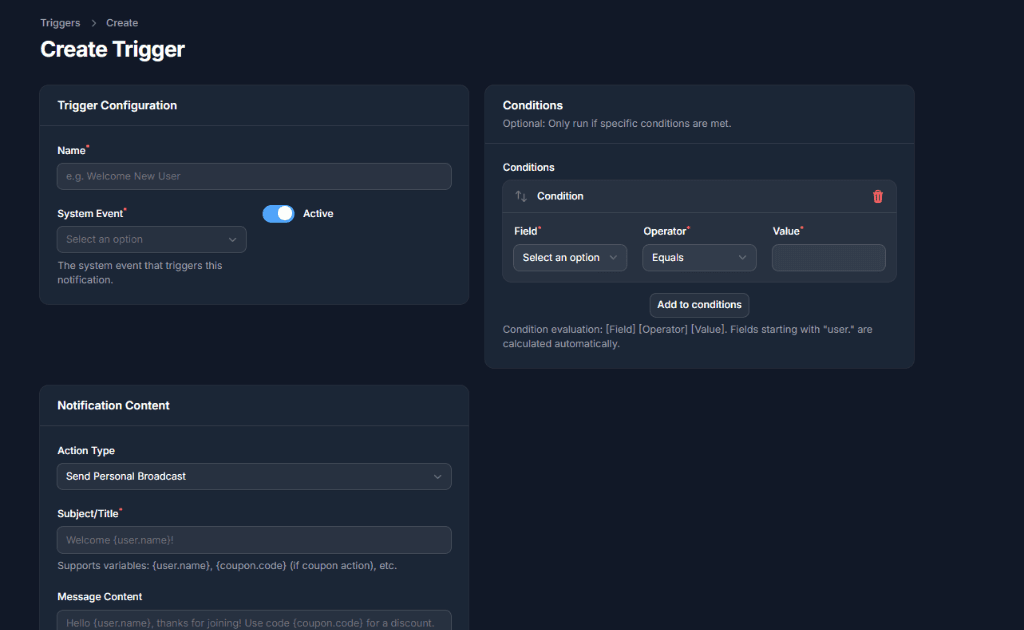
Visual Trigger Editor
Easily configure complex automation rules with our intuitive UI.
// Example: Registering a custom trigger event
AdvancedBroadcasting::registerTrigger(
    'user.upgraded',
    'User Upgraded Package',
    ['package_name', 'old_package', 'new_price']
);
Frontend Integration
Seamless User Experience
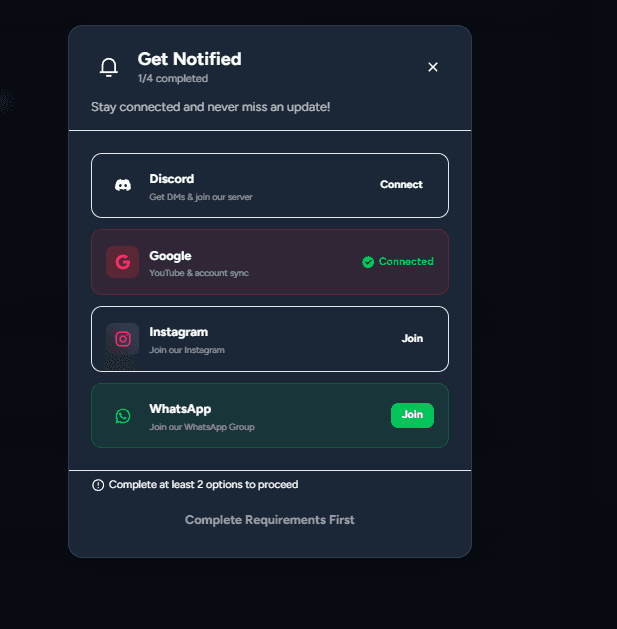
Our extension injects a beautiful, native-feeling modal into your Paymenter frontend. Users can easily connect their accounts without leaving your dashboard.
Core Features
Advanced Manual Broadcasting
Multi-channel campaigns with granular controls.
Granular Filtering
Target by active services, products, country, or linked accounts.
Multi-Channel
Email, SMS (beta), and WhatsApp (beta) simultaneously.
Smart Queueing
Throttled messaging to prevent rate-limiting.
Intelligent Scheduled Reminders
- Billing Automation: Reminders X days before/after due date.
- Service Notices: Suspension or expiration warnings.
- Quiet Hours: "Do Not Disturb" time enforcement.
Event-Driven Automation
- Triggers: Registration, Payment, Ticket Open, Installation.
- Dynamic Coupons: Auto-generate codes like
{coupon.code}for rewards.
Community Growth
- Auto-Join Server: Configure the extension to automatically add users to your Discord server when they connect their account during registration.
- Role Sync: Automatically assign roles and valid nicknames based on user profile.
Broadcast Management
A centralized command center for all your communications. View past broadcasts, analyze delivery rates, and clone successful campaigns with a single click.
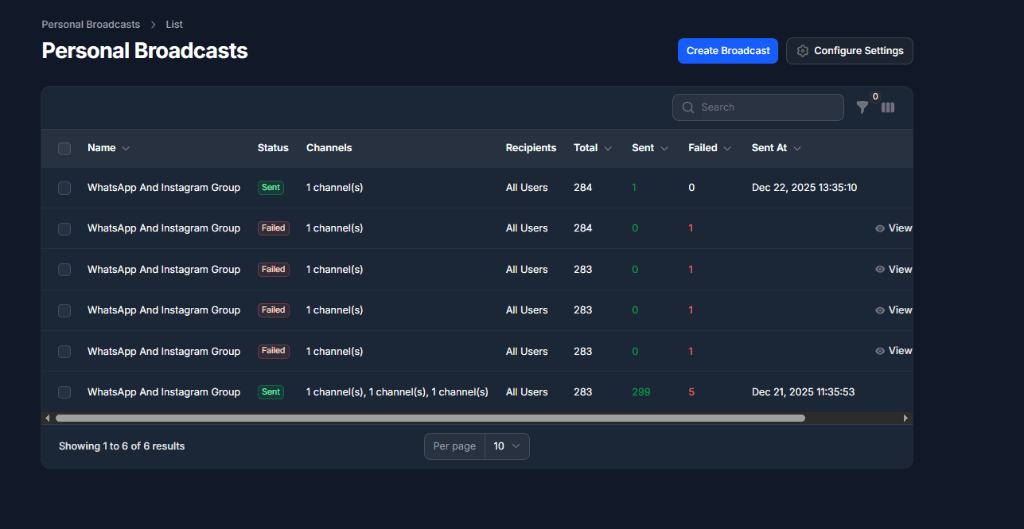
Comprehensive Logs
Track status across all channels in real-time.
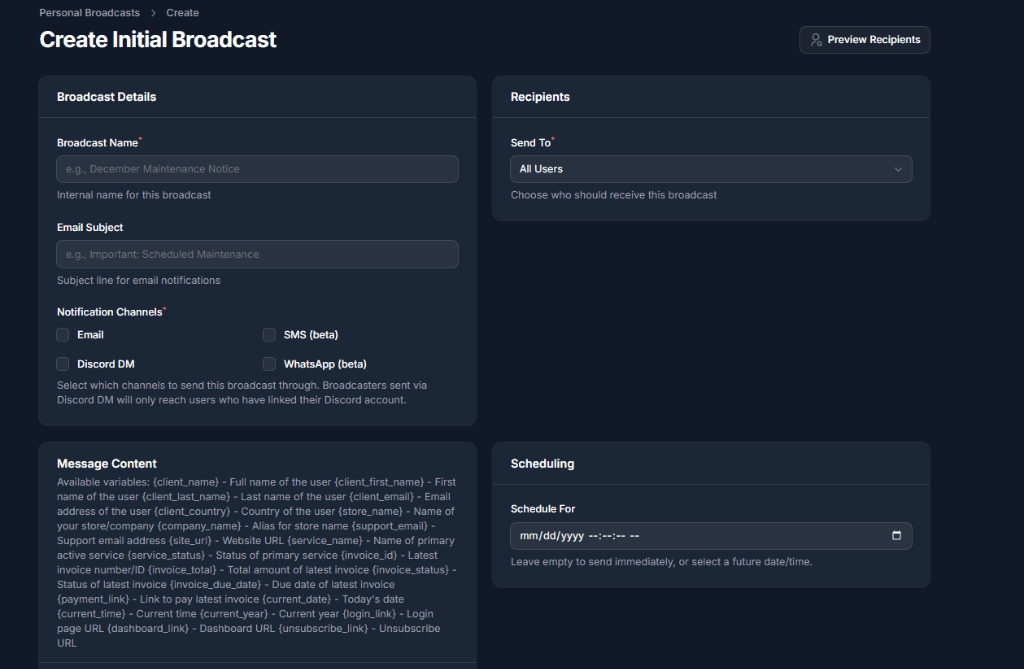
Powerful Editor
Draft messages with live preview and variable support.
Key Capabilities
Smart Rate Limiting
Automatically handles API limits for Discord and WhatsApp to prevent bans.
Recipient Filtering
Target specific user groups based on product ownership or activity.
User & Account Verification
Security & Linking
OTP Verification (Beta)
Verify phone numbers via WhatsApp or SMS. Features 10-minute expiry and secure cache validation.
Linked Accounts
Dashboard for users to manage connections:
- • Discord OAuth (Server Sync)
- • WhatsApp/Phone (OTP)
- • Google OAuth
Checkout GatePowerful feature
Intercepts users at invoice payment to ensure reachable contacts.
Channel Configuration
Twilio & Meta WhatsApp (Beta)
Native support for Twilio/Meta Cloud API for production-grade WhatsApp Business messaging.
Generic SMS Gateways (Beta)
Compatible with any provider supporting HTTP GET/POST requests.
Discord Bot & OAuth Setup
To enable Discord account linking and server features, you must create a Discord Application.
1Create Application
Go to the Discord Developer Portal and create a "New Application".
2OAuth2 Configuration
- Redirect URI:
https://yourdomain.com/oauth/advanced-broadcasting/discord/callback - Scopes:Ensure your application supports
identify,email, andguilds.join. - Credentials:Copy your Client ID and Client Secret into the Paymenter Admin settings.
3Bot Configuration
- Token:Go to the "Bot" tab and click "Reset Token" to get your Bot Token.
- Privileged Gateway Intents:You MUST enable Message Content Intent for the bot to send DMs to linked users reliably.
- Permissions:The bot requires
Send MessagesandCreate Public Threadspermissions in your server.
Google OAuth Setup
Google Actions Configuration
For Google connections to work properly with this extension, you must add a new redirect URL to your existing Google Cloud Console project.
🔗 Redirect URL
Add the following URL to your Authorized redirect URIs list in the Google Cloud Console:
https://yourdomain.com/oauth/advanced-broadcasting/google/callbackTechnical Reference
Dynamic Placeholders
| Variable | Description |
|---|---|
| {client_name} | Full Name |
| {invoice_total} | Amount Due |
| {payment_link} | Invoice URL |
| {coupon.code} | Auto-Generated Code |
Monitoring
- Activity LogsTrack every broadcast and OTP attempt.
- Debug LoggerReal-time API responses from Discord/Twilio.
- AnalyticsConversion funnel tracking.